
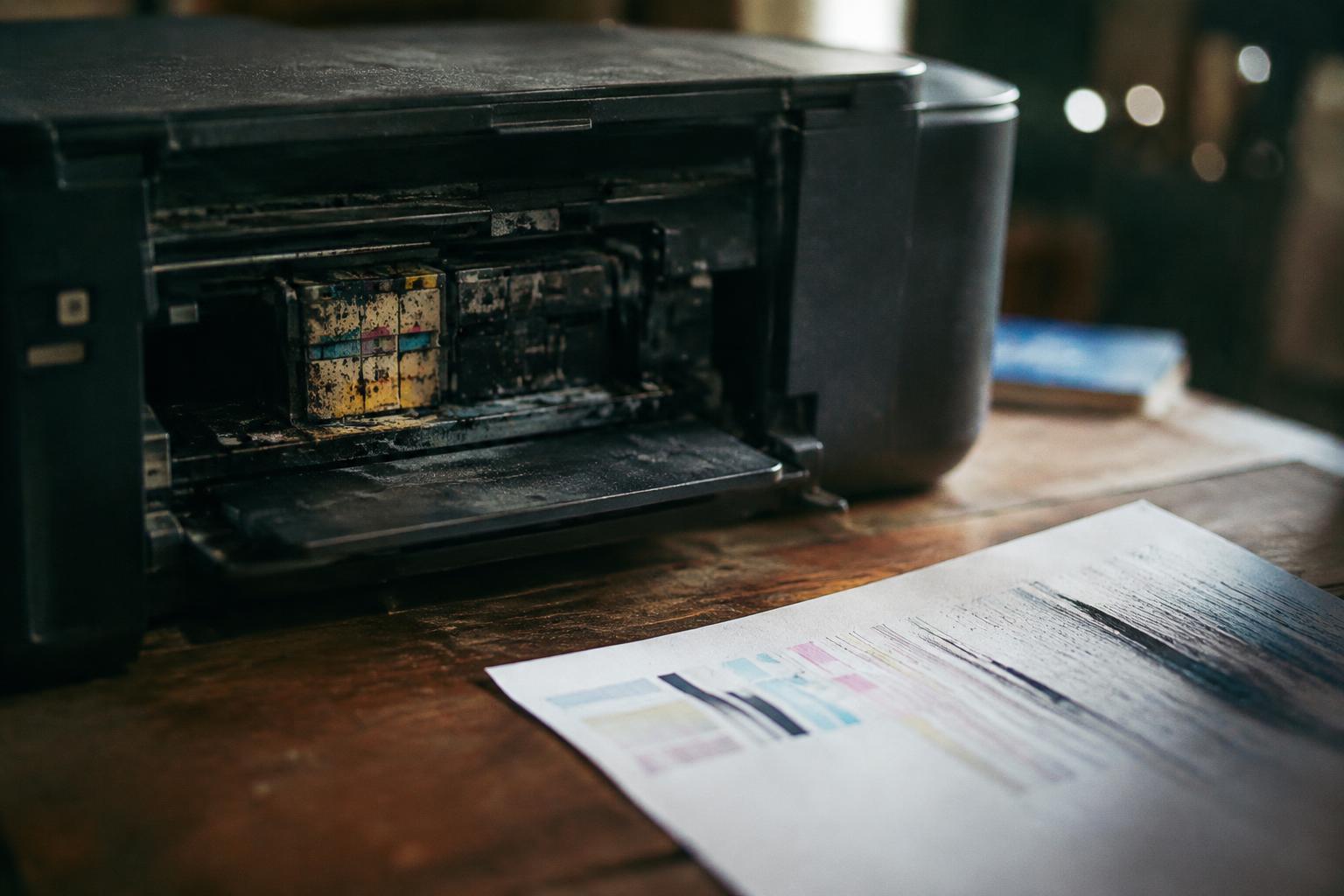
An inkjet printer can look perfectly intact after months in storage, yet dried ink inside its nozzles may disrupt printing as soon as you switch it on. Clogged printhead nozzles often cause streaks, missing colors, or blank sections, while sealed cartridges and proper storage can reduce the risk. The damage depends on the printer’s design, ink type, and storage conditions.
Key Takeaways:
- Months without use can let ink dry in an inkjet printer’s nozzles, clogging the printhead and causing missing lines, streaks, or blank areas.
- Cartridges and printheads are more prone to clogging in warm, dry conditions; printers with removable printheads and individual ink tanks may need different cleaning steps from models with printheads built into the cartridges.
- Run the printer’s nozzle check before printing a large job. If the pattern has gaps, use the manufacturer’s printhead-cleaning cycle and retest before seeking repair.
What Happens to Ink and Printheads During Storage
Inside an idle inkjet printer, ink remains exposed to air at the tiny openings of the printhead nozzles. Over several months, moisture can evaporate there, leaving pigment or dye residue that narrows or blocks the passages. Clogged nozzles disrupt the fine ink droplets needed for clean text and solid color, so your first print after storage may show gaps or missing lines.
- Cartridge ink can thicken as its liquid components evaporate.
- Air entering the ink path can interfere with ink flow.
- Residue may build up around the nozzle plate.
Many printers park the printhead against a sealing station when powered off, but that seal cannot prevent all evaporation over a long idle period. Printhead design matters: some models keep the nozzles with the cartridges, while others use a separate, fixed printhead connected to replaceable cartridges. In either design, dried ink can affect individual color channels, leaving a cyan or black band incomplete.
Factors That Affect Damage Risk
Your printer’s design shapes how ink behaves during a long idle period. Models with a stationary printhead and replaceable cartridges keep the nozzles inside the machine, while some cartridge-based designs include the printhead in each cartridge. Printhead placement affects which components remain exposed to drying ink, and a cartridge that carries its own printhead also carries that wear point when replaced.
Ink formulation and cartridge construction also influence deterioration. Dye-based ink is water-soluble, while pigment-based ink contains fine solid particles suspended in liquid; either can dry at the nozzle, but pigment particles add a risk of deposits in narrow channels. Sealed cartridges limit air exchange, whereas refillable tanks and poorly seated cartridges expose more ink to evaporation.
Storage conditions determine how quickly ink and printer components change. Heat speeds evaporation, direct sunlight warms the casing, and very dry air encourages moisture loss; dust can settle around the carriage or enter open paper paths. A stable indoor room, away from radiators and windows, is less demanding than an attic or garage with temperature swings. Heat and dry air are especially hard on exposed nozzles.
| Factor | Lower-risk condition | Higher-risk condition |
|---|---|---|
| Printhead design | Replaceable cartridge with integrated head | Fixed head with exposed nozzles |
| Ink system | Sealed cartridges | Open or refillable tanks |
| Ink type | Dye-based ink in a sealed cartridge | Pigment ink left exposed at the nozzle |
| Storage location | Stable, shaded indoor room | Hot, dry area with temperature swings |
How to Restore a Printer After Months of Inactivity
Inspect and Prepare the Printer
Begin with the printer powered off and unplugged, then inspect the cartridge bay for loose paper, dust, or visible ink residue. Wipe accessible surfaces with a soft, lint-free cloth; keep liquids away from electrical contacts and the printhead. Check the manufacturer’s instructions before removing cartridges, since some models seal or park the printhead differently. Never force a cartridge or printhead out of its holder.
Run the Built-In Cleaning Cycle
After reinstalling the cartridges, connect the printer and use its maintenance menu to print a nozzle-check pattern. If lines are missing, run one standard printhead-cleaning cycle, then print another pattern. Follow the model’s recommended pause between cycles, because repeated cleaning consumes ink and can fill the waste-ink absorber. Use the printer’s own cleaning function rather than pouring solvent into the head or soaking cartridge contacts.
- Load plain paper in the designated tray.
- Confirm each cartridge clicks securely into place.
- Use the printer driver’s utility if the control panel lacks maintenance options.
Common Symptoms and When Repair Is Needed
Clogs, Streaks, and Hardware Faults
Faded colors, missing lines, or blank areas on a nozzle-check pattern point to partially clogged nozzles, while repeated horizontal bands often indicate blocked jets or a printhead alignment problem. Run the printer’s built-in nozzle check before cleaning; a single cleaning cycle can clarify whether dried ink is the cause. Grinding noises, carriage movement that stops abruptly, or persistent paper-feed errors suggest mechanical trouble rather than a simple ink blockage.
| Symptom | Likely cause | When repair is needed |
|---|---|---|
| Missing colors or fine lines | Clogged nozzles | After cleaning fails to improve the nozzle check |
| Horizontal bands across prints | Blocked jets or alignment fault | If alignment and cleaning do not correct the bands |
| Grinding or stalled carriage | Carriage, belt, or motor fault | Stop using the printer and seek service |
| Paper-feed errors with clear rollers | Sensor or feed mechanism fault | If the error persists with correctly loaded paper |
When Cleaning Is Not Enough
Persistent defects after the recommended cleaning cycle, a printhead error that returns, or ink leaking inside the case warrant professional inspection. Repeated deep-cleaning consumes ink and can strain the printhead without resolving a failed component. Stop printing if you hear scraping or see the carriage jam, since forcing it can damage the belt or encoder strip; note any error code displayed before contacting a repair technician.
How to Store an Inkjet Printer for an Extended Break
Before packing the printer, follow its manual’s shutdown procedure and leave the cartridges installed unless the manufacturer directs otherwise. Removing them can expose the printhead nozzles to air and allow ink to dry. Use the printer’s power button, not a power strip, so the printhead parks in its sealed position; keep cartridges installed in models designed to store them in the carriage.
Choose a cool, dry location away from direct sunlight, heaters, and damp basements. Keep the printer level to reduce the risk of ink leaking or shifting inside the machine, and cover it with a clean, breathable dust cover after it has cooled. Avoid airtight plastic wrap, which can trap moisture around the casing and electrical contacts.
- Remove all paper from the input tray.
- Close the paper guides and output tray.
- Secure loose cables without bending them sharply.
- Keep the printer upright during transport.
For cartridge-specific precautions, follow the instructions supplied with your printer, since storage requirements differ between models. If you are weighing up common problems after a long pause, read Inkjet printer issues after sitting unused for months for user-reported examples.
Preventive Maintenance Before and After Inactivity
Before leaving your printer idle, run a nozzle check and print a small color test so ink flows through each channel. Use the printer’s power button to shut it down, allowing the printhead to park and seal at its designated rest position. Keep the cartridges installed, and store the machine in a cool, dry place away from sunlight, heaters, and dust.
| Routine | When | Why it matters |
|---|---|---|
| Print a nozzle check | Before inactivity | Confirms ink is flowing before storage |
| Shut down with the power button | Before inactivity | Lets the printhead return to its parked position |
| Print a small color test | After inactivity | Moves ink through the nozzles |
| Run one cleaning cycle if needed | After a failed test | Clears minor nozzle blockages |
After the break, print a nozzle check or a small color test before starting a long job. A missing line or uneven color signals that you should run the printer’s standard cleaning cycle once, then test again; repeated cleaning consumes ink, so avoid running cycles back to back without checking the result.
To wrap up
Leaving an inkjet printer unused for several months can dry ink in the nozzles, weaken print quality, and, in severe cases, require printhead repair or replacement. Your outcome depends on the printer’s storage conditions, ink system, and maintenance cycle. Run the manufacturer’s cleaning routine and a nozzle check before printing important documents, then replace any dried or expired cartridges as needed. For a long break, store the printer level with cartridges installed and capped.
FAQ
What happens when you leave an inkjet printer unused for several months, and can it still work?
An inkjet printer may still work after several months, but ink can dry in the printhead and cause blocked nozzles or poor print quality. The risk depends on the printer, ink, and storage conditions, so a long idle period does not guarantee damage.
How long does it take to get an inkjet printer working again after months of inactivity?
A printer may need only a nozzle check and one cleaning cycle, or several rounds of troubleshooting if ink has dried in the printhead. Follow the manufacturer’s instructions and allow time between cleaning cycles, since repeated cleaning can use substantial ink.
Can cleaning a clogged inkjet printhead damage the printer?
Using the printer’s built-in cleaning function as directed is generally safer than scraping or soaking the printhead. Repeated cleaning can waste ink, and removing or manually cleaning a printhead may damage some models, so check the printer manual before attempting it.
Is it worth repairing an inkjet printer that has been unused for months?
Repair may be worthwhile if the printer is valuable or the problem is limited to a cleanable clog, but replacement can make more sense if hardware has failed. Compare the repair cost with the price of a suitable replacement, including any ink or parts the repair may require.
Should I leave the cartridges in an inkjet printer if I will not use it for a while?
For a typical break, leave cartridges installed and follow the manufacturer’s storage guidance rather than removing them. An unsealed printhead or cartridge can dry out, though some models have a specific shutdown or storage procedure that takes precedence.